
What’s New in Document3D 2020
Continuous product improvement, release by release.
Pages3D Professional 2020
Pages3D 2020 includes many new upgrades designed to bolster the software’s ability to create interactive and printed technical documents from 3D CAD files. New tools, like Custom Selection Sets make it easier to stay organized and Publish PDF documents with Embedded Vector Graphics which is a first for 3D publishing.

@@IMG:pages3d_2020.png@@
Publisher3D Professional 2020
Publisher3D 2020 provides tool and publishing upgrades to image, vector, PDF, and HTML publishing. New tools makes it easier to publish the exact desired illustration size and aspect ratio.
@@IMG:publisher3d_2020.png@@
New Updated UI/Modern Icons
New high DPI user interface with modern flat icons. The ribbons and command layout stay the same so there is no need to relearn the user interface.

@@IMG:modern_icons.png@@
Custom Selection Sets
Selections sets allow you to organize custom groups of parts and subassemblies into named sets. These sets are convenient for easily selecting, showing or hiding multple parts at one time.

@@IMG:selection_sets.png@@
Apply Commands to Multiple Selected Illustrations
Easily and efficiently apply a command to multiple selected illustrations for easy illustration creation and maintenance over time. Most common illustration commands can be applied in this way.

@@IMG:apply_to_selected.png@@
New Storyboard Selection Commands
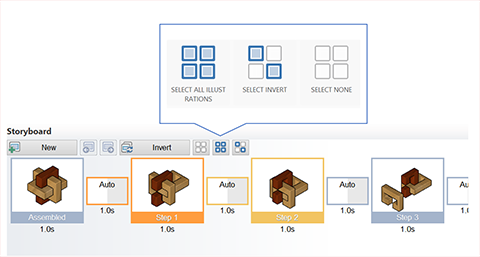
New storyboard selection tools make it easy to select all, none or invert he selection. These are valuable when used in tandem with the new apply command to selected illustrations feature.
@@IMG:storyboard_selection.png@@
Custom Illustration Sizes
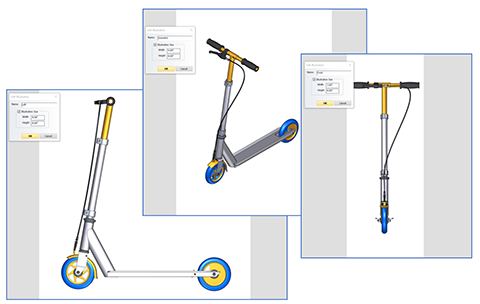
Not all illustrations are the same. Assign a size to each individual illustration so the view can be positioned correctly, the markups can be placed in the viewport and published illustration come out as desired.
@@IMG:illustration_sizes.png@@
Create Graphic Files based on Individual Illustration Sizes
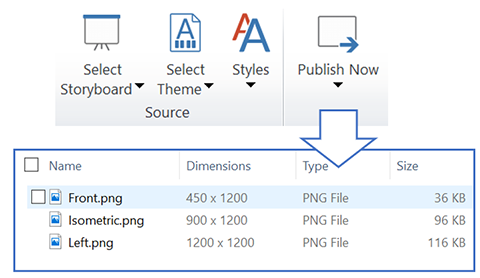
Publish illustrations to the exact size that is best per each individual illustration. Using this new feature, cropping is easy and flexible before publishing and there is no longer any need to do so after.
@@IMG:illustration_publish2.png@@
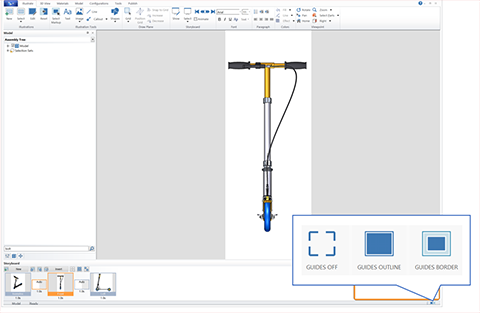
Illustration Guides
Illustration guides provide a visual indicator of the user-defined illustration size. These guides are used to position views, layout markups and consider how the image will be cropped when published.
@@IMG:illustration_guides.png@@
Transparent Backgrounds
In 2020, illustrations can be rendered with transparent backgrounds when published to raster and vector formats, like PNG and SVG, that support transparency. Transparent images are easy to incorporate into other projects.

@@IMG:publish_transparent.png@@
Publish Vector Graphics to PDF Documents
With Pages3D 2020, users can choose to publish high-quality vectors graphics to a PDF document. This generates scalable line art and often results in smaller file sizes than high-resolution images.

@@IMG:pdf_vectors.png@@
Vector Publishing Performance and Quality
Faster vector publishing reduces time waiting to publish. Better quality SVG, EPS, PS and PDF vector files increase customer satisifcation with informative graphics.

@@IMG:vector_quality2.png@@
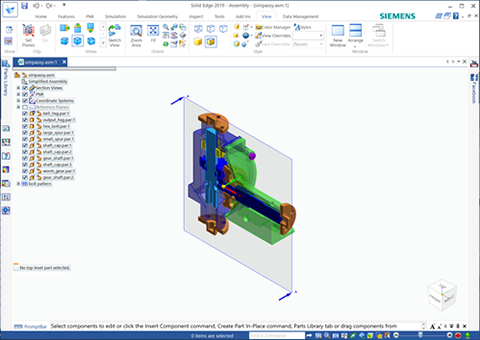
Solid Edge Section Support
Reuse sections created in Solid Edge in your 3D-based documentation. Even complex Solid Edge sections are supported.
@@IMG:se_sections.png@@
Windows Core/Foundation Upgrades
The 2020 products are updated with a current version of the Microsoft foundation libraries resulting in a tight integration with Windows 10 that includes updated standard dialogs.

@@IMG:windows_10.png@@
Backstage Application Menu
The file menu has been replaced with the more graphical backstage view common in many modern Windows-native applications, such as Microsoft Office.

@@IMG:backstage2.png@@
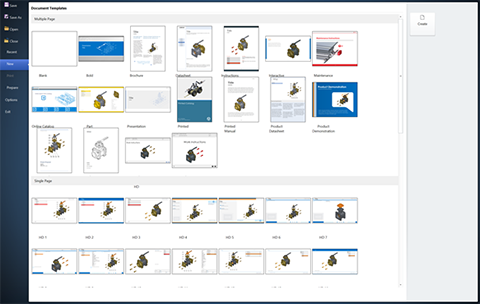
Updated New Document Wizard
The Pages3D new document wizard is seamlesly integrated into the new backstage appplication menu system. Larger template thumbnails for better visualization when using high-resolution monitors.
@@IMG:document_wizard.png@@
Try Document3D today
Every release builds on the last — download the current trial and see all of it in one product.